If you’re a student, you’ve likely heard about MLA format. It may sound confusing at first, but it’s actually simple once you learn the basics. In this guide, you’ll learn how to do MLA format step by step in the easiest way possible.
Whether you’re writing an essay, research paper, or assignment, using the correct format helps your work look clean and professional. It also shows your teacher that you understand proper writing rules.
I’ve personally used MLA format many times, and I remember how confusing it felt at the start. But once you follow a few clear steps, everything becomes easy. Let’s break it down together in a simple and friendly way.
What Is MLA Format?
MLA format stands for Modern Language Association format. It is a style used for writing papers, especially in English and humanities subjects.
When you learn how to do MLA format, you are learning how to:
- Structure your paper
- Add citations
- Create a works cited page
It keeps your writing organized and easy to read.
Why MLA Format Matters
MLA format is not just about rules. It helps your reader understand your work better. Teachers and professors expect this format in many assignments.
Here’s why it’s important:
- It makes your paper look neat
- It avoids plagiarism
- It shows your sources clearly
- It builds trust in your writing
When you know how to do MLA format, your work becomes more professional and credible.
Basic MLA Format Rules You Must Know
Before writing, you should understand the core rules. These are simple but very important.
| Rule | Details |
|---|---|
| Font | Times New Roman, size 12 |
| Spacing | Double-spaced |
| Margins | 1 inch on all sides |
| Alignment | Left-aligned |
| Header | Last name + page number |
These basics are the foundation of how to do MLA format correctly.
How to Set Up MLA Format Step by Step
Let’s walk through the setup process in a simple way.
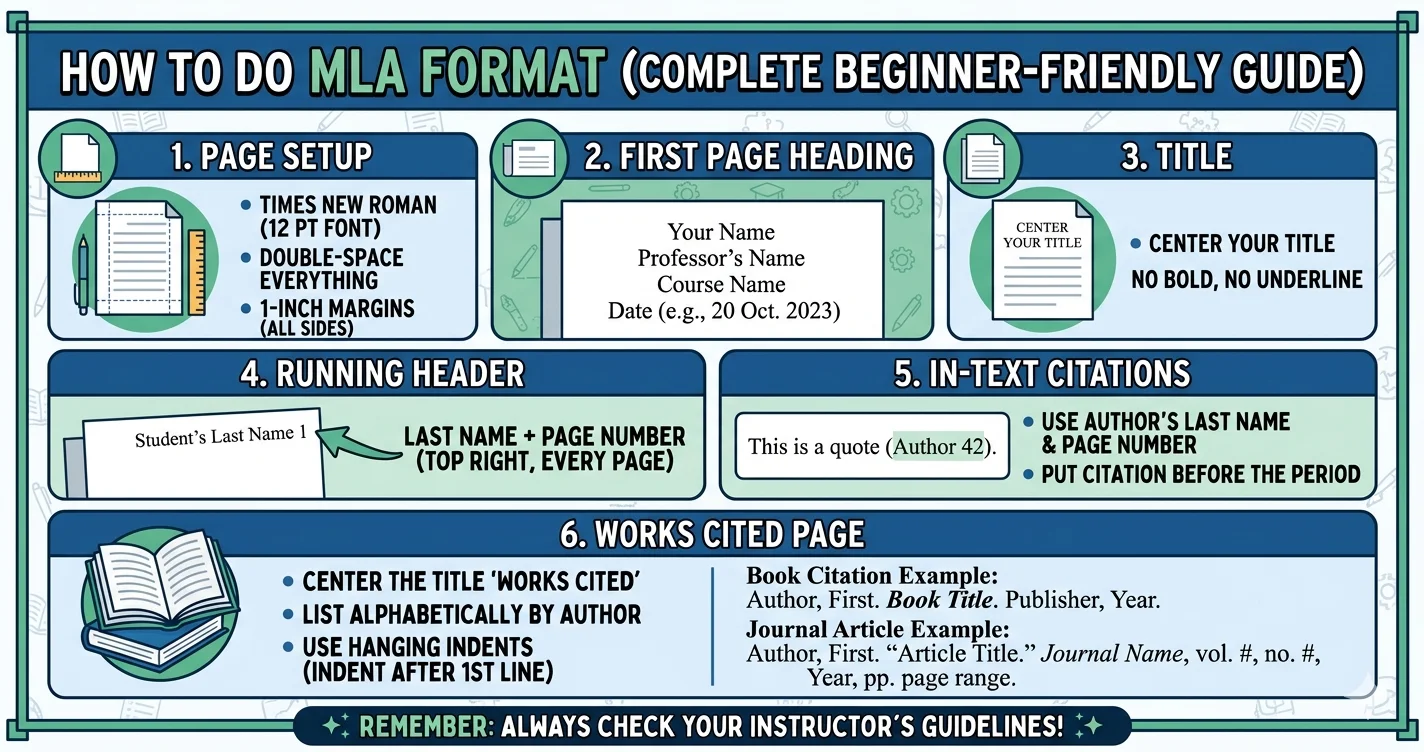
First, open your document. Set your font to Times New Roman and size 12. Then adjust margins to 1 inch on all sides.
Next, make sure your text is double-spaced. Do not add extra spaces between paragraphs.
Add a header in the top right corner. Write your last name and page number.
On the first page, include:
- Your name
- Teacher’s name
- Subject
- Date
Then center your title. Do not bold or underline it.
This is the basic way to start when learning how to do MLA format.
How to Do MLA Format in Google Docs
Many students use Google Docs for assignments. It’s easy to set up MLA format here.
Start by opening a new document. Go to “Format” and select double spacing. Then set margins using “File > Page Setup.”
To add a header:
- Click “Insert”
- Choose “Headers & Footers”
- Add your last name and page number
Google Docs also has templates, but it’s better to learn manually. That way, you fully understand how to do MLA format in google docs.
How to Do MLA Format in Word
Microsoft Word is another common tool. The steps are similar but slightly different.
Open Word and set:
- Font: Times New Roman
- Size: 12
- Line spacing: Double
Go to “Layout” to adjust margins. Then insert a header using “Insert > Page Number.”
Word makes it easy to follow MLA rules once you know where everything is. This helps you master how to do MLA format in word quickly.
How to Write Titles in MLA Format
Your title should be simple and clean. Do not bold, underline, or italicize it.
Place the title in the center of the page. Use normal font size. Avoid fancy styles.
Example:
| Correct Title | Incorrect Title |
|---|---|
| The Impact of Social Media | THE IMPACT OF SOCIAL MEDIA |
| Climate Change Effects | Climate Change Effects |
Keeping your title simple is an important part of how to do MLA format properly.
How to Do Quotes in MLA Format
Quoting sources is a key part of writing. MLA format has clear rules for this.
Short quotes (under 4 lines):
- Add quotation marks
- Include author name and page number
Example:
“Education is the key to success” (Smith 23).
Long quotes (over 4 lines):
- Start on a new line
- Indent the text
- Do not use quotation marks
Learning how to do quotes in mla format helps you avoid mistakes and plagiarism.
How to Do MLA Format Citation
Citations tell readers where your information comes from. MLA uses simple in-text citations.
Basic format:
(Author Last Name Page Number)
Example:
(Johnson 45)
If no author:
(“Article Title” 12)
Here’s a quick guide:
| Source Type | Citation Example |
|---|---|
| Book | (Smith 23) |
| Website | (Brown) |
| Article | (Taylor 10) |
Understanding how to do mla format citation is very important for academic writing.
How to Create a Works Cited Page
The works cited page lists all your sources. It comes at the end of your paper.
Steps:
- Start on a new page
- Title it “Works Cited”
- Center the title
- List sources alphabetically
Each entry should be double-spaced with a hanging indent.
This step is key when learning how to do works cited in mla format.
How to Do a Works Cited Page in MLA Format
Let’s look at a simple example:
| Source Type | Format Example |
|---|---|
| Book | Smith, John. Title of Book. Publisher, Year. |
| Website | Brown, Lisa. “Article Title.” Website Name, Date. |
| Journal | Lee, Mark. “Study Title.” Journal Name, Year. |
Make sure punctuation and order are correct. Small mistakes can cost marks.
Mastering how to do a works cited page in mla format will improve your grades.
Common MLA Formatting Mistakes to Avoid
Even small mistakes can affect your work. Here are common errors:
- Wrong font or size
- Missing header
- Incorrect spacing
- Forgetting citations
- Messy works cited page
I’ve made these mistakes myself when learning how to do MLA format, so double-check your work.
Tips to Make MLA Formatting Easy
Here are some helpful tips:
- Use templates for practice
- Always proofread your paper
- Keep examples saved
- Use citation tools carefully
- Ask your teacher if unsure
Once you practice, how to do MLA format becomes second nature.
Real Example of MLA Format (Simple Layout)
Here’s a basic structure:
| Section | What to Include |
|---|---|
| Header | Last name + page number |
| Heading | Name, teacher, course, date |
| Title | Centered |
| Body | Double-spaced paragraphs |
| Works Cited | Source list |
Seeing examples makes learning how to do mla format much easier.
FAQs About MLA Format
1. What is MLA format used for?
MLA format is used for writing papers in subjects like English and literature.
2. How do I start MLA format?
Start with proper margins, font, spacing, and header setup.
3. How to do MLA format in Google Docs quickly?
Use built-in tools for spacing and headers, then follow MLA rules step by step.
4. How to do quotes in MLA format correctly?
Use quotation marks for short quotes and indentation for long quotes.
5. What is a works cited page?
It is a list of all sources used in your paper.
6. Is MLA format hard to learn?
No, once you practice, it becomes very easy.
Final Thoughts
Learning how to do MLA format may feel tricky at first, but it becomes simple with practice. Focus on the basics like spacing, font, and citations. These small steps make a big difference.
I recommend practicing with a sample paper. The more you use MLA format, the more confident you’ll feel. Soon, you won’t even need to think about the rules.
If you found this guide helpful, try applying these steps to your next assignment. You’ll see better results and cleaner writing right away.